
What is the Automation ROI? Calculating Exactly How Much Money Custom Software Saves Your Team
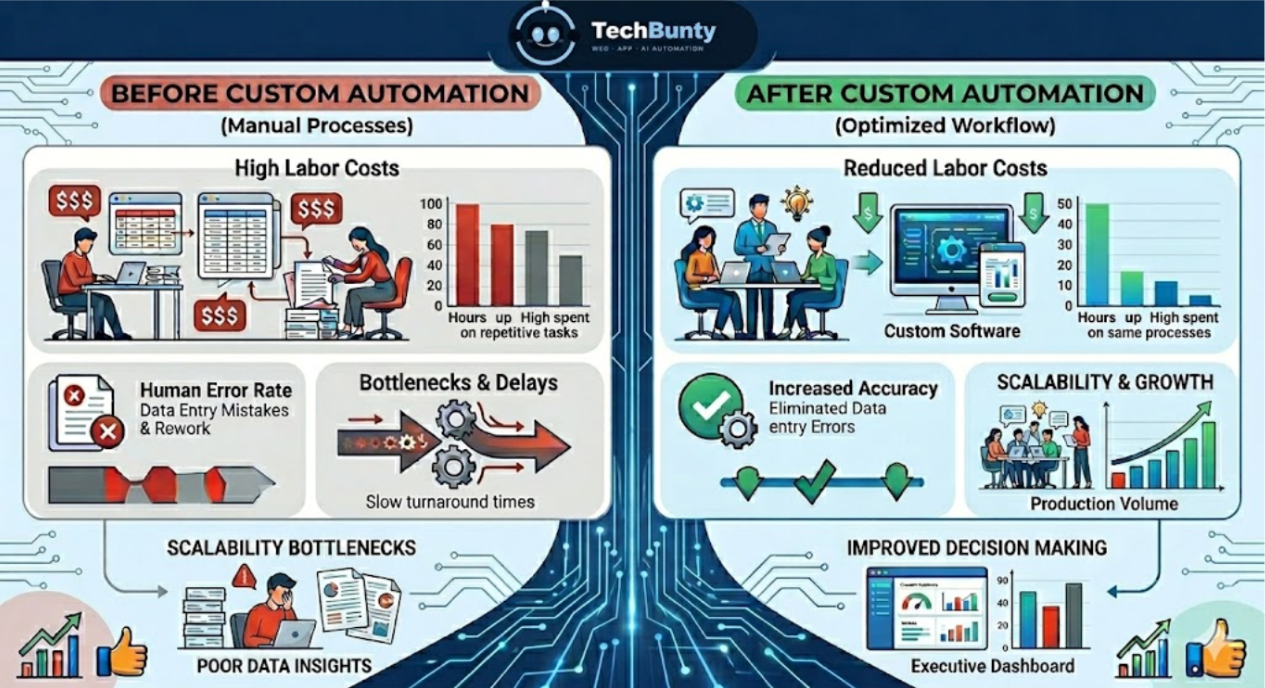
Automation is often sold as a way to “save time” or “increase efficiency,” but those phrases are vague and executives don’t invest based on vague promises. They invest based on return on investment (ROI). The real question isn’t whether automation is helpful; it’s exactly how much money it saves, where those savings come from, and how quickly they compound.
Moving Beyond "Efficiency" to Measurable Value
Automation is often sold as a way to “save time” or “increase efficiency,” but those phrases are vague and executives don’t invest based on vague promises. They invest based on return on investment (ROI). The real question isn’t whether automation is helpful; it’s exactly how much money it saves, where those savings come from, and how quickly they compound.
Custom software automation goes a step further than off-the-shelf tools. Instead of forcing your team to adapt to rigid workflows, it adapts to your processes eliminating friction, redundancy, and hidden inefficiencies. This article breaks down how to calculate automation ROI in concrete terms and analyzes the real financial impact across operations, labor, and decision-making while also considering the role of widely used tools like Google Chrome in modern workflows.
Understanding ROI in Automation: The Core Formula
At its simplest, ROI is calculated as:
ROI = (Net Gain from Automation – Cost of Automation) / Cost of Automation × 100
But in practice, automation ROI is more nuanced because gains come from multiple sources:
Labor cost reduction
Time savings (converted into productivity)
Error reduction
Faster decision-making
Opportunity cost recovery
Breaking It Down
Let’s say a company invests $20,000 in custom automation software. Over one year, it saves:
- $15,000 in labor costs
- $10,000 in productivity gains
- $5,000 in reduced errors
Total Gain = $30,000
ROI = (30,000 – 20,000) / 20,000 × 100 = 50%
This is a simplified model but it shows that automation ROI is not theoretical. It’s quantifiable.
Labor Cost Reduction: The Most Immediate Savings
At its simplest, ROI is calculated as:
The Problem
Many teams spend hours on repetitive tasks:
- Data entry
- Report generation
- CRM updates
- Manual follow-ups
Even when using tools like Google Chrome, employees often switch between tabs, copy-paste data, and manually synchronize information between systems.
The Impact
Let’s assume:
- An employee earns $10/hour
- Spends 3 hours/day on repetitive tasks
- Works 22 days/month
Monthly cost of wasted labor = $660 per employee
Yearly cost = $7,920
Total yearly loss = $79,200
Automation Effect
Custom software can reduce this by 70–90%, meaning:
- Savings of $55,000+ annually
- Freed-up time for high-value work
- Works 22 days/month
Labor savings are the easiest ROI component to measure because they are direct and immediate. However, many companies underestimate this because they don’t track how much time employees actually spend on low-value tasks.
Time Savings = Productivity Gains
Time saved doesn’t just reduce cost, it creates capacity.
Example Scenario
A sales team spends
- 2 hours/day updating CRM
- 1 hour/day generating reports
Automation reduces this to 30 minutes total.
Time saved per employee = 2.5 hours/day
If that time is redirected to revenue-generating activities:
- More calls
- More deals
- Better client engagement
Financial Translation
If one extra deal per month is closed due to freed time
- Deal value = $2,000
- Annual gain per employee = $24,000
This is where automation ROI becomes exponential. Unlike labor savings (which are linear), productivity gains scale with performance. The more effective your team is, the higher the ROI multiplier.
Error Reduction: The Hidden Cost Center
The Problem
Manual processes introduce errors:
- Incorrect data entry
- Missed follow-ups
- Reporting inaccuracies
Even when working in structured environments (like browser-based tools in Google Chrome), human error remains unavoidable.
Cost of Errors
Errors can lead to:
- Lost customers
- Financial discrepancies
- Rework costs
- Reputation damage
Let’s quantify:
- 5% error rate in manual tasks
- Each error costs $50 to fix
- 1,000 transactions/month
Monthly error cost = $2,500
Yearly cost = $30,000
Automation Impact
Automation can reduce errors by up to 90%:
New yearly cost = $3,000
Savings = $27,000
Error reduction is often overlooked in ROI calculations, yet it significantly impacts long-term profitability. More importantly, it improves trust in data, which directly affects decision-making quality.
Workflow Optimization: Eliminating System Friction
Employees constantly switch between tabs often within browsers like Google Chrome to complete a single workflow.
This leads to:
- Context switching
- Delays
- Data silos
Automation Solution
Custom software integrates these systems into a unified workflow:
- Data flows automatically
- No manual syncing
- Real-time updates
Financial Impact
If workflow inefficiencies waste:
- 1 hour/day per employee
- 10 employees
- $10/hour
Yearly loss = $26,400
Automation can recover most of this.
Workflow optimization is where custom software outperforms off-the-shelf solutions. Instead of adapting to tools, the tools adapt to your process resulting in smoother operations and measurable cost savings.
Faster Decision-Making: The Strategic Advantage
The Problem
Manual reporting delays decisions:
- Weekly reports
- Outdated data
- Slow Insights
Even with dashboards accessed via Google Chrome, data is often not real-time.
Automation Impact
Custom automation enables:
- Real-time dashboards
- Instant KPI tracking
- Predictive analytics
Financial Value
Faster decisions lead to:
- Quicker response to market changes
- Better inventory management
- Optimized marketing spend
Example:
- Delayed decision costs $1,000/week
- Automation reduces delay by 80%
Yearly savings = $41,600
This is a strategic ROI component. It’s harder to measure but often delivers the highest long-term value. Businesses that act faster outperform competitors even if their operational costs are similar.
Opportunity Cost Recovery
The Concept
Opportunity cost is what your team could be doing instead of repetitive work.
Example
Instead of:
- Entering data
- Fixing errors
Your team could be:
- Closing deals
- Innovating products
- Improving customer experience
Financial Translation
If automation frees:
- 20 hours/week across a team
- And those hours generate $50/hour in value
Weekly gain = $1,000
Yearly gain = $52,000
Opportunity cost is often the largest hidden ROI driver. Companies that fail to account for it drastically underestimate the true value of automation.
Cost of Automation: What You Need to Consider
To calculate ROI accurately, you must include all costs:
Initial Costs
- Development of custom software
- Integration with existing systems
- Training employees
Ongoing Costs
- Maintenance
- Updates
- Hosting
Example
- Initial cost: $25,000
- Annual maintenance: $5,000
- Total 3-year cost = $40,000
Putting It All Together: A Realistic ROI Model
To calculate ROI accurately, you must include all costs:
Annual Gains
Labor savings
Productivity gains
Error reduction
Workflow optimization
Faster decisions
Total Annual Benefit = $166,000
Costs
- Year 1: $25,000
- Year 2–3: $5,000/year
3-Year Cost = $35,000
Net Gain (3 years) = $498,000 – $35,000 = $463,000
ROI ≈ 1322%
The Role of Tools Like CHrome in Automation Ecosystems
While automation is often associated with backend systems, front-end tools like Google Chrome play a crucial role:
How Chrome Fits In
Access point for SaaS tools; interface for dashboards; platform for extensions and automation scripts
Limitations Without Custom Automation
Tab overload; manual navigation; fragmented workflows
With Custom Automation
Integrated dashboards reduce tab switching; browser-based workflows become seamless; extensions can trigger automated processes
Chrome and similar tools are enablers, not solutions. Without custom automation, they amplify inefficiencies. With automation, they become powerful interfaces for streamlined operations.
Watch Out Calculating Automation ROI
1. Ignoring Small Time Losses
Minutes add up to thousands of dollars annually.
2. Underestimating Error Costs
Even small mistakes compound over time.
3. Overlooking Opportunity Cost
The biggest ROI driver is often invisible.
4. Focusing Only on Short-Term Gains
Automation delivers exponential long-term value.
Practical Example: Automating Invoice Processing
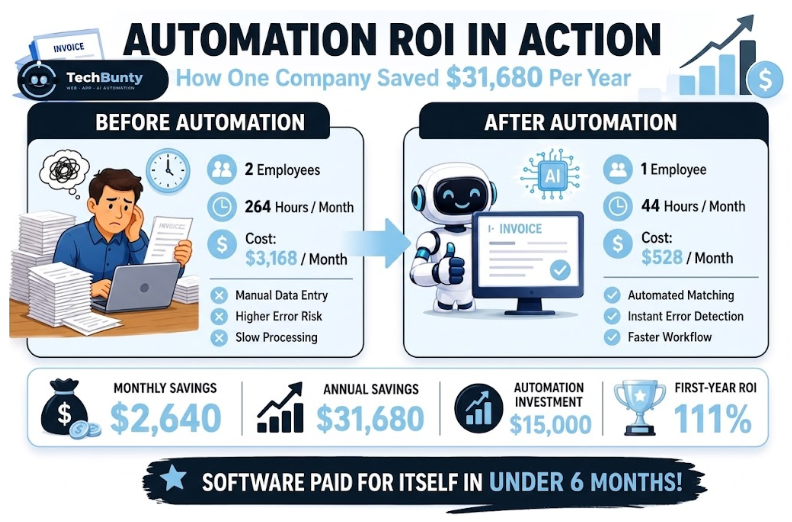
Here’s a clear, real-life practical example that shows how automation ROI actually works in a business setting:
Automating Invoice Processing
- ❌ 2 employees handling invoices full-time
- ❌ Time spent: 6 hours/day each
- ❌ Monthly hours: 2 × 6 × 22 days = 264 hours/month
- ❌ Average hourly cost: $12/hour
- ❌ Monthly Cost: 264 × $12 = $3,168
- ✅ Automatically extracts invoice data (OCR + AI)
- ✅ Matches invoices with orders
- ✅ Flags errors instantly
- ✅ Only 1 employee needed, 2 hours/day
- ✅ Monthly hours: 1 × 2 × 22 = 44 hours/month
- ✅ New Monthly Cost: 44 × $12 = $528
Extra (Often Overlooked) Benefits
- Fewer human errors → less financial leakage
- Faster processing → better vendor relationships
- Real-time financial visibility → smarter decisions
- Team freed up for higher-value work
Automation isn’t just about “saving time” it directly reduces operational costs and turns repetitive work into measurable financial gains. In this case, the software paid for itself in under 6 months and kept generating savings after that.
3 Recent Insights on Automation ROI
In 2026, the discussion around custom software and automation ROI has shifted from simple “time-saving” metrics to evaluating the impact of AI-native workflows and agentic systems on enterprise efficiency. Here are three recent insights on calculating the value of these investments:
1. AI Automation ROI: What to Realistically Expect in 2026
2. AI Automation Stats 2026: 25 Powerful Numbers to Know Now
3. Custom Software Development Solutions: How Businesses Reduce Risk, Improve ROI, and Build Smarter Operations
Automation as a Financial Strategy, Not Just a Tool
Automation is not just about saving time, it’s about reallocating resources to where they generate the most value. When calculated properly, the ROI of custom software is not incremental, it’s transformative.
The combination of:
- Reduced labor costs
- Increased productivity
- Fewer errors
- Faster decisions
- Recovered opportunities
creates a compounding financial effect that far exceeds the initial investment.
And while tools like Google Chrome remain central to daily workflows, the real competitive advantage comes from what happens behind the scenes: intelligent, automated systems designed specifically for your business.
In a world where efficiency is expected, automation ROI is no longer optional; it’s the metric that defines whether your business is scaling or standing still.
Automation is no longer just about saving time, it's about driving measurable financial growth
When calculated properly, custom software delivers real ROI through cost reduction, increased productivity, and smarter decision-making.
ROI is clear and measurable
ROI from automation is clear and measurable.
Small inefficiencies, big costs
Small inefficiencies create big hidden costs.
Scalable long-term growth
Custom solutions enable scalable, long-term growth.
FAQs
What is automation ROI, and how do you calculate it?
Automation ROI (Return on Investment) is the formula used to measure the exact financial return your business gets from investing in automated systems. While the basic formula divides your net gains by the initial development cost, a realistic calculation is much more detailed. It combines direct labor cost reduction, productivity gains from saved time, error reduction, and the financial value of faster, real-time decision-making.
How does custom software deliver a better return than off-the-shelf tools?
Off-the-shelf tools are rigid and often force your employees to change how they work, leading to system friction. Custom software is built specifically to fit your existing business processes. It tackles workflow optimization directly by connecting your different tools (like your CRM and ERP) into a single system. This stops your team from constantly switching between browser tabs in Google Chrome just to copy-paste data, saving hours of wasted labor.
What is "opportunity cost recovery," and why does it matter?
Opportunity cost is the hidden loss of what your team could have been doing while they were stuck doing boring, repetitive tasks. When you implement custom software automation, you free up those wasted hours. Instead of manual data entry, your employees can spend their time closing deals, helping customers, or inventing new products. Recovering this lost time turns a basic operational saving into massive, active revenue growth.
Why is error reduction considered a "hidden" financial benefit?
Human mistakes in manual workflows, like typos in data entry or missed follow-up emails, are highly expensive to fix and can hurt your reputation. Even when employees use browser-based tools in Google Chrome, errors still happen. Because automated systems don’t get tired or distracted, they can cut mistakes by up to 90%. This error reduction instantly stops financial leaks, making it a massive driver of your overall automation ROI.
Is automation just about "saving time," or is there a bigger business strategy?
Saving time is only the first step. The real goal of custom software is to turn those time savings into a long-term financial strategy. By combining labor cost reduction with automated data flow and real-time dashboards, business leaders can make critical decisions in minutes rather than waiting days for manual reports. This agility gives your company a major competitive advantage, making automation essential for scaling your business smoothly.
Table of Contents
ToggleKey Stats

Ready to Boost Your ROI?
Let TechBunty build smart, custom solutions that save time, cut costs, and scale your business starting today.
Latest Post
- All Posts
- AI
- AI Agents
- AI Automation
- Anthropic
- App Development
- Cybersecurity
- LLMs
- Physical Ai
- Web Development